QMX Labs QMX SDR Transceiver
This primer considers QMX Labs QMX SDR Transceiver, the ideal radio for Low-Power QRP work.
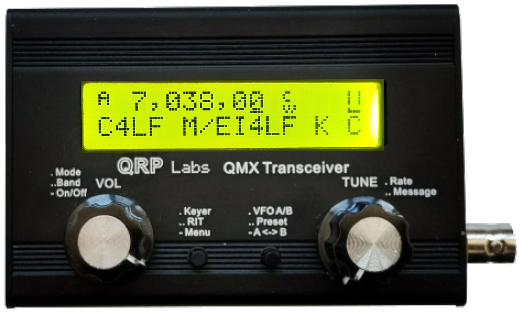
Layout
There are four devices on the front of the radio: two knobs (VOL and TUNE) and two buttons. For these descriptions, we refer to:
- Left Knob: VOL
- Left Button: Menu, RIT and Keyer
- Right Button: A<->B, Preset, VFO A/B
- Right Knob: TUNE
Basic Operation Procedure
- Power Up: Hold Left Knob for a few seconds.
- Switch Modes: Short press the Left Knob to scroll through CW or DiGi modes.
- Switch Bands: Short double press the Left Knob to scroll between bands: 3.5 MHz (80 m), 5.3 MHz (60 m), 7 MHz (40 m), 10 MHz (30 m), 14 MHz (20 m).
- Adjust Frequency: Single click the Right Knob to move the cursor along the digits. Rotate the Right Knob to adjust the numerals.
Check the antenna Standing Wave Ratio (SWR)
- Hold the Left Button for a few seconds until a menu appears (e.g., “Audio”).
- Rotate the Right Knob to the Hardware tests option.
- Press the Left Button to reach Tune SWR.
- Press it again to see the SWR: menu, then press it once more to activate the SWR test on low power. (Ensure SWR is below 1.5).
- Press the Right Button three times to return to the main screen.
Programme a CW Message
- Hold the Left Button for a few seconds until the menu appears.
- Rotate the Right Knob to the Messages option.
- Press the Left Button to enter, then rotate the Right Knob to choose one of the 12 memories.
- Press the Left Button to edit; an underline cursor will appear.
- Use the Right Knob to select letters/numbers. Use the arrow characters (→←) to move the cursor forward or backward.
- When finished, press the Right Button twice to return to the main screen.
Send a Stored Message
- Select: Double click the Right Knob and rotate it to scroll through messages.
- Send: Press the Left Button to transmit.
- Stop: Press the Right Button to stop sending.
Turn off Radio
Hold the Left Knob for a few seconds and the radio will shutdown.
.
.