
SSH Passwordless login with Public key authentication
Diarmuid O'Briain, ada@lovelace.com02/01/2017, version 1.0

- Generate a pair of keys
- Review the Public key
- Review the Private key
- Upload Public key to the server
- Confirm functionality
- Additional Security
- Restart the SSH daemon
- Test
Last updated: 02-01-2017 10:00
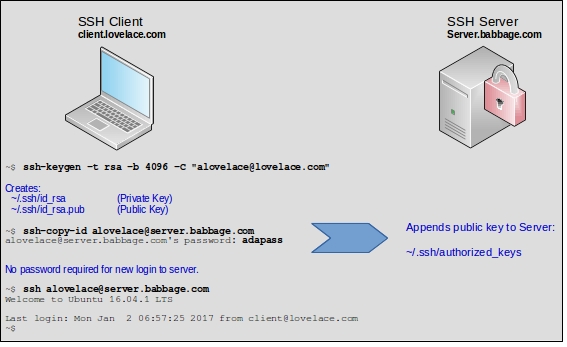
Generate a pair of keys
  alovelace@client.lovelace.com ~ $ ssh-keygen -t rsa -b 4096 -C "ada@lovelace.com"
  Generating public/private rsa key pair.
  Enter file in which to save the key (/home/alovelace/.ssh/id_rsa):
  Enter passphrase (empty for no passphrase):
  Enter same passphrase again:
  Your identification has been saved in /home/alovelace/.ssh/id_rsa.
  Your public key has been saved in /home/alovelace/.ssh/id_rsa.pub.
  The key fingerprint is:
  SHA256:HX6Zw7eAiDnP4qtlY/zEyBoTSyIaVWqyf9zr1vUlB0c ada@lovelace.com
  The key's randomart image is:
  +---[RSA 4096]----+
  |    .            |
  |   o          E  |
  |. +       .  .   |
  | =     o + +.o.  |
  |+ . o + S + Bo.  |
  |.+ + * *  ...+o. |
  |. . * @.=. . +.  |
  |   . O.*.   .    |
  |    o+=..        |
  +----[SHA256]-----+
Add the new private key identity to the authentication agent. This command when run without arguments adds the files ~/.ssh/id_rsa, ~/.ssh/id_dsa, ~/.ssh/id_ecdsa, ~/.ssh/id_ed25519 and ~/.ssh/identity.
  alovelace@client.lovelace.com ~ $ ssh-agent
  Identity added: /home/alovelace/.ssh/id_rsa (/home/alovelace/.ssh/id_rsa)
Review the Public key
  alovelace@client.lovelace.com ~ $ cat ~/.ssh/id_rsa
  -----BEGIN RSA PRIVATE KEY-----
  MIIJKQIBAAKCAgEAyv9H42AlmzvNhIXRrErINgq9NJHPDKvVSGUJDH/8yw7H/4b/
  I3h+2XuIREmuiIU5umflvWox8SD/nGdn9o3etEYURflO8IlhFHuHAM1dwOnERmP5
  dheY5LFaLAZT8vddSHUX6/wkIAGcxedAZT+bJyMqrPI56kag/6vw/6iiVHHWBYjl
  5E4tS1Ox+Z3ktQAf84zeLpFGY38Ag0MxE/YR9UmdT7FXU8QASaFfZdfMzgrLGoVI
  J9/B4EP74wTq85jtFfWdzC3PVAjYwBLdbPd5It2UewGRjWvX+waH2XbZ4ns/E3Oa
  phVplXpTnjl4tcKPlIG6ZLbgEb5h/9mUxBQJ6QFsb85Y17gJ/7NYW0ORmXrdmblU
  NFuq0oNNaVyoW35pCHgrmeuoL+5jbpTEtSndKcC5a18CzfH5bZIeQGku4l1OYLJa
  HJqwLlhUsA156/URuHpV6+OCP575R95pwj+GkZU9HInO0gbGuE8CsL3ay+3H65Xb
  Cu9EfK8z7RmrGYovY5cHptK0KojORE8YXGM+5olMMHzgCkDNp+fQ4bet4apMdOC/
  nlXIbt+PrD6L7oL7av3NHaKCEzGKlZWHHkFOy93yoZTQ1htRZP4mIh1l5B+bYtLM
  XcbFB7AmSjQ0eRNit6jiW1yCbLt+zQv8la1IC9R9uGZ9olip41hs/2zmhGECAwEA
  AQKCAgEAstiu8XjoKRhLPZLY5D8One5gPEyqarOJubqqekTY594h/tNlPk8PE3Vu
  3Rs9ljIqZjzbgEJrtdIo4heI1QSxTYrgmbXJAstGqNEcZGyLSUesEYhLZOvtXK+U
  jm0U0V925Dul09fVzA0fnozbg1jCzXyCQNU4iVuoxRkrv1NHkbappT6zrK3j4hXf
  G9ksgvuVKvLVXZnItihSv1MXjkqiD8XHv0qzca2hwz1V21iBrJZ90uPSaq8NFRVQ
  evb+OZhmaY54dEd3/sW8kZ0NUM/H/hvSkX0US9DT/OoIDmRUGuIS9IRJoEIFQBkC
  Ssi/vQOplGGnYsxsJbXiiZOdKhOtlfQ115l6g3S0kPieEpFFGzAMfeAVK24QZMhJ
  /JS36luVlvcUhadujuplpD8oljVYNIFCw/SgpD+4mXRcLTuKxAGCyIjepPqZERab
  Pl4CCQZl8ULYJrDyLYC7H8qMqWkmeY+9TwvLBlxclHkRrhmeoWRgleZrZ0IABHLr
  7c0n0vD59pyVPnUsUgvXDtcFRrMro9xvNtCCQUT7aaSKrdVfNVlIyq1XQTTlZhoo
  QHIqukpYmNTiQvDQV3YSQV6xfyg3txDlCF9FhIxN3i53Lfv/x7rYgBU5EfTGb3W1
  Dpv4tqMWTiwmHwf+z+KYwGDmLSTAYsbf/zWPFX0C7ypufeQifAECggEBAP0J3tyr
  To98bquomL/gfpHdP0MLHC12/QBHtTvJeXo2QXNc6oRY3K/dVoXg2Ft2pXvnkncr
  5iwnF6TJG6/aVusW7QZMLeXsqwChKtQYiPmnt05qdlzLJ4CL/bR0CVwSxyUZOVYw
  QLgVtwVOBc7YwJGp93lDbvlE50uIMVW2BfrAm9s6d0j4Zfv4MM1qHSO35J5Rq+dX
  cUkVjZR0dmfvBTd7p8h1NSnMLjbB8OMzpinLlgp58y7p2Uyd9n7EcPtTEY5CPwq0
  w6TceqzIjsunUx2lN2uRmXgIx0enmPvFaUPlT3DwVNW8jzdGPIIzlzQVSlw8PLOg
  iqEwFL0PHfPDmJECggEBAM1fey/Ge/wpuwnIkwGS77ia2WwKA66+ga1OpHl0AAaT
  NQ84SrlZegsgUhmmvib06vtG+rp0LCx737iiub/o6jycLPu0WK7ZWIhUCFlIhuST
  jvTvnrOG4WmHzPwzz72Nxxyh83EUHwci//NUDYqgYkgoH4fT+Hn7p0C7WsCCdPAV
  KzIy5fbBAMI2c8dlJ6Qt0vlP8vvSixEqVoRucd+EE4xF681IPGQfLTTYCrn7ETBU
  wlKQZ4iqpriiGlKsVzeWd0oMh1ZsJRyMhuDHoHbfe7JZgZYLQmAK6+to8rpOzv28
  2y55Sp5DX8V7UoxYZ8BOubSKmBE4PD/srHq1uBqyltECggEAG3abyqWJJEekF1t4
  ILMz6Y7y08r75u9YLFScFf4bAimrVuMJzQ17/lZukp9BvEOXWGhc3DRWigpAJbFy
  INb4whE97oYMIT1bnfjgFh8HltkeKxOg/xdJlUkcYx6I+YZMOPmQ4IriK1ioAZpj
  RPz/gY/J/U5VWBajZ+5DNINKCNoo0FV7Jt9W6k8YtOLEgODvnkNM/hHeiMkfEbLG
  OyeVEF2Ka1ZVS9EOXwETrQUpDrY69a4gt8HHxOoMG9wkSxLL//2uq/HMnjMT2Xb3
  EKF7gucwqasm1gFV57AICaN2dlkIE0DyZDRP8vbbkGIbEhsRdAtRp0lQYog+Z/qh
  DJj5EQKCAQEAhXudsXusckUdUEqRYeCC9tWOo24O3rDr0BzhQh9nNN7RCcdoqffC
  HyEuu4Vo6iEd6ZxEspN3cqJA0tzRJi7Yr/RCOIcLbPnPVSxpEL7XDhHqRMDJwZ3V
  PKYLUZDLYUSZOb75X3HYiObyvNDQzF1aA9QwSjQ3t/Ec0DH11lH0d2cK4GG8nhjr
  yU9jCSJyFX/DNFAGei5qPQnrmb+/O6u4mN+JV6+vsNOiqkoRDrhkf6lXdBpvcKCa
  JD8YJMvnFDYz6mkiPcWkiV28/LRDU4AGAfGzDDbdOVdf524a9YTrfHgXbalgGmVo
  Bg8VpCqBpLiGcxXxqJ+IaXQG1urtckzJQQKCAQAYLjEhpjdQP1dsCSrPNUUVR5fV
  myUl7xit+3T8e8j8VZ1BGRiYv3XP8ntt9jRUEFXI5iI8xxp4UglA+sLBSAIw0ge0
  t5cQA4Zz7ybns4xF4ctfWGepBGnDlgwggc74Hhvno1UeaNwDicX+USFjL+EhdXBs
  VfKR0+sDR6EBNN6B4BNMIitsW6jAFK9iW6QPZdJfLcN7IHD3V4pvI6Ksuo3uqVxq
  uBIFjoQa7OBJu4u+U7mM6Wuawz/T0HXdo/csfo3Dl6KwzXeUUjrugOJQmTlNXLt0
  B6f/4DeMfjZ93LmyFJv5inMgOflK+oV4dJ55wRprLx5l4s+9UGeMvuqK3JXM
  -----END RSA PRIVATE KEY-----
Review the Private key
  alovelace@client.lovelace.com ~ $ cat ~/.ssh/id_rsa.pub
  ssh-rsa AAAAB3NzaC1yc2EAAAADAQABAAACAQDK/0fjYCWbO82EhdGsSsg2Cr00kc8Mq9VIZQkMf/zLDsf/hv8jeH7Ze4hESa6I
hTm6Z+W9ajHxIP+cZ2f2jd60RhRF+U7wiWEUe4cAzV3A6cRGY/l2F5jksVosBlPy911IdRfr/CQgAZzF50BlP5snIyqs8jnqRqD/q/
D/qKJUcdYFiOXkTi1LU7H5neS1AB/zjN4ukUZjfwCDQzET9hH1SZ1PsVdTxABJoV9l18zOCssahUgn38HgQ/vjBOrzmO0V9Z3MLc9U
CNjAEt1s93ki3ZR7AZGNa9f7BofZdtniez8Tc5qmFWmVelOeOXi1wo+UgbpktuARvmH/2ZTEFAnpAWxvzljXuAn/s1hbQ5GZet2ZuV
Q0W6rSg01pXKhbfmkIeCuZ66gv7mNulMS1Kd0pwLlrXwLN8fltkh5AaS7iXU5gslocmrAuWFSwDXnr9RG4elXr44I/nvlH3mnCP4aR
lT0cic7SBsa4TwKwvdrL7cfrldsK70R8rzPtGasZii9jlwem0rQqiM5ETxhcYz7miUwwfOAKQM2n59Dht63hqkx04L+eVchu34+sPo
vugvtq/c0dooITMYqVlYceQU7L3fKhlNDWG1Fk/iYiHWXkH5ti0sxdxsUHsCZKNDR5E2K3qOJbXIJsu37NC/yVrUgL1H24Zn2iWKnj
WGz/bOaEYQ== ada@lovelace.com
Upload Public key to the server
Connect to the server and append the public key to the list of authorised keys on the server. This is in the ~/.ssh/authorized_keys file.
  alovelace@client.lovelace.com ~/.ssh $ ssh-copy-id alovelace@server.babbage.com
  alovelace@server.babbage.com's password: adapass
  /usr/bin/ssh-copy-id: INFO: Source of key(s) to be installed: "/home/alovelace/.ssh/id_rsa.pub"
  /usr/bin/ssh-copy-id: INFO: attempting to log in with the new key(s), to filter out any that are already installed
  /usr/bin/ssh-copy-id: INFO: 1 key(s) remain to be installed -- if you are prompted now it is to install the new keys
  alovelace@server.babbage.com's password:

  Number of key(s) added: 1

  Now try logging into the machine, with:   "ssh 'alovelace@server.babbage.com'"
  and check to make sure that only the key(s) you wanted were added.
Confirm functionality
Connect to the server from the client. Note that no password is requested.
  alovelace@client.lovelace.com ~ $ ssh alovelace@server.babbage.com
  Welcome to Ubuntu 16.04.1 LTS (GNU/Linux 4.4.0-31-generic x86_64)

   * Documentation:  https://help.ubuntu.com
   * Management:     https://landscape.canonical.com
   * Support:        https://ubuntu.com/advantage

  0 packages can be updated.
  0 updates are security updates.


  Last login: Mon Jan  2 06:57:25 2017 from client@lovelace.com
Review the uploaded Public key on the server.
  alovelace@server.babbage.com:~$ cat ~/.ssh/authorized_keys
  ssh-rsa AAAAB3NzaC1yc2EAAAADAQABAAACAQDK/0fjYCWbO82EhdGsSsg2Cr00kc8Mq9VIZQkMf/zLDsf/hv8jeH7Ze4hESa6I
hTm6Z+W9ajHxIP+cZ2f2jd60RhRF+U7wiWEUe4cAzV3A6cRGY/l2F5jksVosBlPy911IdRfr/CQgAZzF50BlP5snIyqs8jnqRqD/q/
D/qKJUcdYFiOXkTi1LU7H5neS1AB/zjN4ukUZjfwCDQzET9hH1SZ1PsVdTxABJoV9l18zOCssahUgn38HgQ/vjBOrzmO0V9Z3MLc9U
CNjAEt1s93ki3ZR7AZGNa9f7BofZdtniez8Tc5qmFWmVelOeOXi1wo+UgbpktuARvmH/2ZTEFAnpAWxvzljXuAn/s1hbQ5GZet2ZuV
Q0W6rSg01pXKhbfmkIeCuZ66gv7mNulMS1Kd0pwLlrXwLN8fltkh5AaS7iXU5gslocmrAuWFSwDXnr9RG4elXr44I/nvlH3mnCP4aR
lT0cic7SBsa4TwKwvdrL7cfrldsK70R8rzPtGasZii9jlwem0rQqiM5ETxhcYz7miUwwfOAKQM2n59Dht63hqkx04L+eVchu34+sPo
vugvtq/c0dooITMYqVlYceQU7L3fKhlNDWG1Fk/iYiHWXkH5ti0sxdxsUHsCZKNDR5E2K3qOJbXIJsu37NC/yVrUgL1H24Zn2iWKnj
WGz/bOaEYQ== ada@lovelace.com
Additional Security
Edit the /etc/ssh/sshd_config file.
Permit Root Login
Change the PermitRootLogin to one of yes, prohibit-password, without-password, forced-commands-only, or no. The default is prohibit-password. I would suggest no here.
  alovelace@server.babbage.com:~$ sudo vi /etc/ssh/sshd_config
  ...
  ...
  PermitRootLogin no
  ...
Change SSH Port number
Change the PermitRootLogin to one of yes, prohibit-password, without-password, forced-commands-only, or no. The default is prohibit-password. I would suggest no here.
  alovelace@server.babbage.com:~$ sudo vi /etc/ssh/sshd_config
  ...
  ...
  Port 22022
  ...
Install fail2ban
Fail2Ban consists of a client, server and configuration files to limit brute force authentication attempts. The server program fail2ban-server is responsible for monitoring log files and issuing ban/unban commands. It gets configured through a simple protocol by fail2ban-client, which can also read configuration files and issue corresponding configuration commands to the server.
  alovelace@server.babbage.com:~$ sudo apt-get install fail2ban
  alovelace@server.babbage.com:~$ cd /etc/fail2ban
  alovelace@server.babbage.com:/etc/fail2ban$ sudo cp jail.conf jail.local
  alovelace@server.babbage.com:/etc/fail2ban$ sudo systemctl restart fail2ban
  alovelace@server.babbage.com:/etc/fail2ban$ sudo systemctl status fail2ban
  ● fail2ban.service - LSB: Start/stop fail2ban
     Loaded: loaded (/etc/init.d/fail2ban)
     Active: active (running) since Tue 2017-01-03 10:07:38 EAT; 8s ago
    Process: 1511 ExecStop=/etc/init.d/fail2ban stop (code=exited, status=0/SUCCESS)
    Process: 1524 ExecStart=/etc/init.d/fail2ban start (code=exited, status=0/SUCCESS)
Restart the SSH daemon
On the Server, restart the daemon.
  alovelace@server.babbage.com:~$ sudo systemctl restart ssh

  alovelace@server.babbage.com:~$ sudo systemctl status ssh
  ● ssh.service - OpenBSD Secure Shell server
     Loaded: loaded (/lib/systemd/system/ssh.service; enabled; vendor preset: enab
     Active: active (running) since Mon 2017-01-02 08:08:13 EAT; 8s ago
   Main PID: 7748 (sshd)
      Tasks: 1
     Memory: 728.0K
        CPU: 4ms
     CGroup: /system.slice/ssh.service
             └─7748 /usr/sbin/sshd -D
Test
Test using the root username. THis fails. Test with the ubuntu user. This also fails. Test with the root user to port 22022, this also fails but a connection with the user ubuntu to port 22022 is successful.
  alovelace@client.lovelace.com ~ $ ssh root@server.babbage.com
  ssh: connect to host server.babbage.com port 22: Connection refused

  alovelace@client.lovelace.com ~ $ ssh alovelace@server.babbage.com
  ssh: connect to host server.babbage.com port 22: Connection refused

  alovelace@client.lovelace.com ~ $ ssh root@server.babbage.com -p 22022
  root@server.babbage.com's password:
  Permission denied, please try again.
  root@server.babbage.com's password:

  alovelace@client.lovelace.com ~ $ ssh alovelace@server.babbage.com -p 22022
  Welcome to Ubuntu 16.04.1 LTS (GNU/Linux 4.4.0-31-generic x86_64)

   * Documentation:  https://help.ubuntu.com
   * Management:     https://landscape.canonical.com
   * Support:        https://ubuntu.com/advantage

  73 packages can be updated.
  0 updates are security updates.


  *** System restart required ***
  Last login: Mon Jan  2 08:11:50 2017 from client@lovelace.com

  alovelace@server.babbage.com:~$
Check the fail2ban logs
  alovelace@server.babbage.com:~$ sudo cat /var/log/fail2ban.log
  2017-01-02 06:42:58,363 fail2ban.server [8002]: INFO    Changed logging target to /var/log/fail2ban.log for Fail2ban v0.8.13
  2017-01-02 06:42:58,364 fail2ban.jail   [8002]: INFO    Creating new jail 'ssh'
  2017-01-02 06:42:58,413 fail2ban.jail   [8002]: INFO    Jail 'ssh' uses pyinotify
  2017-01-02 06:42:58,437 fail2ban.jail   [8002]: INFO    Initiated 'pyinotify' backend
  2017-01-02 06:42:58,438 fail2ban.filter [8002]: INFO    Added logfile = /var/log/auth.log
  2017-01-02 06:42:58,439 fail2ban.filter [8002]: INFO    Set maxRetry = 6
  2017-01-02 06:42:58,440 fail2ban.filter [8002]: INFO    Set findtime = 600
  2017-01-02 06:42:58,441 fail2ban.actions[8002]: INFO    Set banTime = 600
  2017-01-02 06:42:58,479 fail2ban.jail   [8002]: INFO    Jail 'ssh' started
  2017-01-02 06:43:00,512 fail2ban.actions[8002]: WARNING [ssh] Ban 123.31.34.240
  2017-01-02 06:43:00,518 fail2ban.actions[8002]: WARNING [ssh] Ban 91.200.12.189
  2017-01-02 06:43:00,524 fail2ban.actions[8002]: WARNING [ssh] Ban 218.108.190.138
  2017-01-02 06:43:00,531 fail2ban.actions[8002]: WARNING [ssh] Ban 195.168.34.219
  2017-01-02 06:43:00,536 fail2ban.actions[8002]: WARNING [ssh] Ban 91.224.161.88
  2017-01-02 06:43:00,541 fail2ban.actions[8002]: WARNING [ssh] Ban 173.71.77.116
  2017-01-02 06:43:00,546 fail2ban.actions[8002]: WARNING [ssh] Ban 95.68.238.227
  2017-01-02 06:43:00,551 fail2ban.actions[8002]: WARNING [ssh] Ban 104.220.52.50
  2017-01-02 06:43:00,556 fail2ban.actions[8002]: WARNING [ssh] Ban 123.30.37.43
  2017-01-02 06:43:00,561 fail2ban.actions[8002]: WARNING [ssh] Ban 84.148.234.140
  2017-01-02 06:43:00,566 fail2ban.actions[8002]: WARNING [ssh] Ban 111.32.134.27
  2017-01-02 06:43:00,572 fail2ban.actions[8002]: WARNING [ssh] Ban 155.4.64.181
  2017-01-02 06:43:00,578 fail2ban.actions[8002]: WARNING [ssh] Ban 66.168.224.45
  2017-01-02 06:43:00,584 fail2ban.actions[8002]: WARNING [ssh] Ban 112.29.175.204
  2017-01-02 06:43:00,589 fail2ban.actions[8002]: WARNING [ssh] Ban 5.145.245.182
  2017-01-02 06:43:00,595 fail2ban.actions[8002]: WARNING [ssh] Ban 195.154.50.178
  2017-01-02 06:51:05,026 fail2ban.actions[8295]: INFO    [ssh] 160.242.131.203 already banned

